
Thanks to this function, the selection of diffusers from my addin will no longer be a painful process. You can adjust the program to your needs and preferences. You can see more in my video linked below.
In article “Air calculator”:


Revit air calculator – program idea
The program allows you to set your own preferences for the selection of diffusers in Revit. Based on your settings, you can then place items directly into the model. When will you use it?
- You select ventilation devices such as diffusers
Instruction how to install my extension you can find here.
How program work
I describe the program in more detail in my video. Here I will only post basic information about the functions included in the calculator.
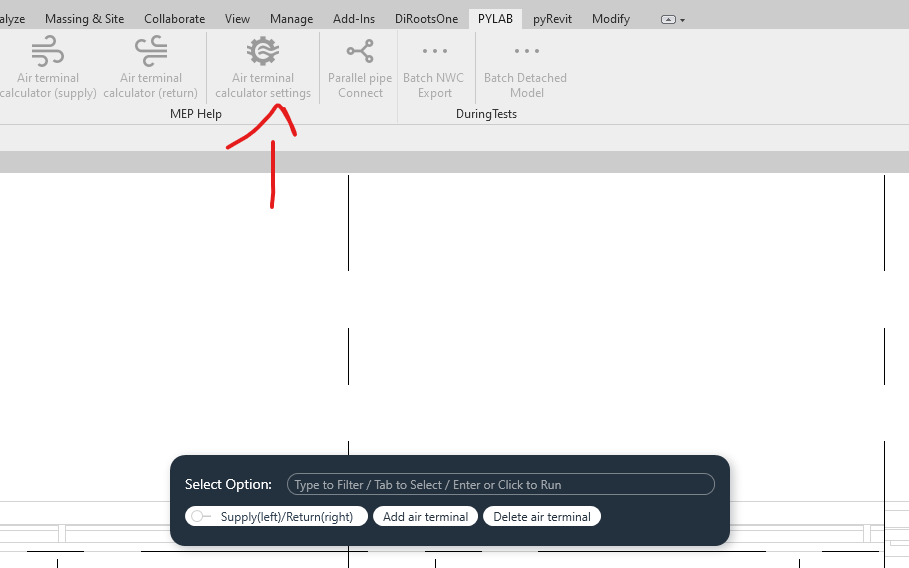
Air terminal calculator settings
Using this function, you can add or remove a preference for the selection of a given air terminal. The program contains separate preferences for the supply and return systems. A detailed description of entering your own preferences can be found in the video below.
Air terminal calculator (supply lub return)
When we enter our own preferences, we will be able to fully use the calculator. Just select the devices you are interested in and enter the air flow. The program will return suggested devices based on our settings.

Film with program use
Source code – Revit air calculator
Below is the code for one of the functions (Air terminal calculator(supply)). For more please visit mine GitHub, where new versions of the overlay will appear on a regular basis.
Copyright (C) 2023 Paweł Kińczyk
## Imports

from Autodesk.Revit.UI.Selection import *
from Autodesk.Revit.DB import *
from pyrevit import forms, script
from rpw import revit
import json
import os


doc = revit.doc
uidoc = revit.uidoc


class CustomISelectionFilter(ISelectionFilter):
    def __init__(self, nom_categorie):
        self.nom_categorie = nom_categorie

    def AllowElement(self, e):
        if e.Category.Name in self.nom_categorie:
            # if self.nom_categorie.Contains(e.Category.Name):
            # if e.Category.Name == self.nom_categorie:
            return True
        else:
            return False

    def AllowReference(self, ref, point):
        return True


def pick_objects(title="Pick", filter=""):
    with forms.WarningBar(title=title):
        return uidoc.Selection.PickObjects(ObjectType.Element, CustomISelectionFilter(filter))


def open_json(name_of_file="", open_method="r"):
    with open(name_of_file, open_method) as file:
        data = json.load(file)
        return data


# Pick air terminal
try:
    air_terminal = pick_objects(
        title="Pick supply air terminal", filter="Air Terminals")
except:
    forms.alert(title="Program Error",
                msg="You didn't pick any air terminal", exitscript=True)

# Write air flow
try:
    air_flow = forms.ask_for_string(
        prompt="Write air supply", title="Air terminal air flow")
    air_flow = int(air_flow)
except:
    forms.alert(title="Program Error",
                msg="You didn't write anything", exitscript=True)

# Get air terminal sizes
os.chdir(os.path.dirname(os.path.abspath(__file__)))
try:
    dqj_list = open_json("air_terminals_supply_settings.json", "r")
except:
    forms.alert(title="Program Error",
                msg="Didn't find settings", exitscript=True)

# Search for prefer family
correct_dqj = []
for dqj in dqj_list:
    dqj_min = int(dqj[0][0:4:])
    dqj_max = int(dqj[0][5:9:])
    if air_flow > dqj_min and air_flow < dqj_max:
        air_flow_avaible = ("{}-{}".format(dqj_min, dqj_max))
        new_dqj = tuple([air_flow_avaible])+tuple(dqj[1])
        correct_dqj.append(new_dqj)

try:
    selected_dqj = forms.SelectFromList.show(
        correct_dqj, title="Select air terminal which you want to pick", multiselect=False, button_name='Select DQJ', width=800)
    selected_dqj_size = selected_dqj[1]
except:
    forms.alert(title="Program Error",
                msg="You didn't pick any type", exitscript=True)

transaction = Transaction(doc, 'Air terminal calculator - PYLAB')
transaction.Start()

# Change to new type
try:
    for element in air_terminal:
        element = doc.GetElement(element)

        if isinstance(element, FamilyInstance):
            family_instance = element
        else:
            family_instance = None


        types = family_instance.Symbol.GetSimilarTypes()
        for i in types:
            if selected_dqj_size in Element.Name.GetValue(doc.GetElement(i)):
                element.ChangeTypeId(i)
except Exception as e:
    forms.alert(title="Program Error", msg=e, exitscript=True)

transaction.Commit()
Please report any irregularities in the operation of the program that occur during use on my social accounts or account GitHub.
See also:
- Revit connect pipes
- Air calculator
- Revit shortcuts
- Dynamo – locating elements in spaces
- Revit pipes type change