Revit connect pipes

In this post, I will present the operation of a new function in my PYLAB add-in. This function is used to connect parallel pipes with a perpendicular section. Connect the pipes with one click!

Everything about Revit from an MEP engineer’s perspective: project setup, families, schedules, plugins and scripts. Posts based on real projects, with ready-made solutions to download.
In this post, I will present the operation of a new function in my PYLAB add-in. This function is used to connect parallel pipes with a perpendicular section. Connect the pipes with one click!
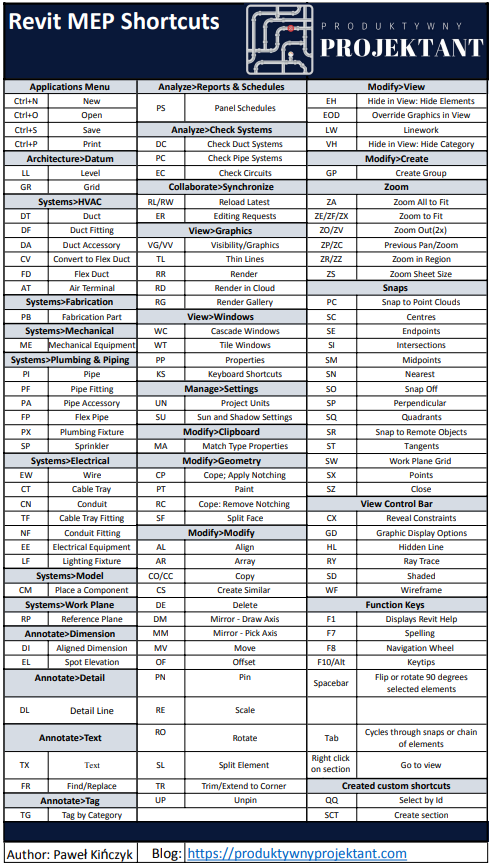
In this post, I am sharing my own compilation of useful keyboard shortcuts for Revit. They'll save you a lot of time.

It is not possible to change the type of pipes in several systems at once in revit. Therefore, the described addin was created.

Do you often search for a space by its name/number? You browse the entire model and lose precious time on searching number in schedules? Just my new function in the PYLAB addin.

Copying parameters in Revit within a single parameter is a time-consuming task. Thanks to the function of copying parameters in my overlay PYLAB you will be able to easily rewrite the value of any parameters for all elements of the selected category.