
With this feature, you won’t have to set the same filter overrides for multiple views. Just create a set on one of the views and then just copy the filters.
In article “Revit copy filters”:
- Revit copying filters – assumptions of the program
- Program in action
- Film with instruction of use
- Source code
- See also

Revit copying filters – assumptions of the program
The revit copy filters feature simplifies the process of creating views in the model. Thanks to it, it is not necessary to create the same filters for each view. Just copy them. You will find this feature useful:
- You will set the appropriate views in the model
- You prepare drawings for printing on a complex model
- During the project, there is a need to create specific filters
Instruction how to install my extension you can find here.
Program in action
First, the program downloads a list of filters in the opened view, and then displays the possible variants. It is possible to select several revit filters at once!

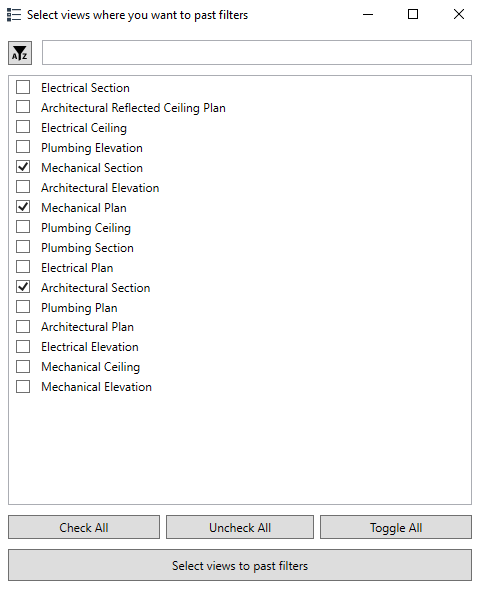
Next, we go to the view selection window to which we want to copy our filter settings. Multiple views are also available here.
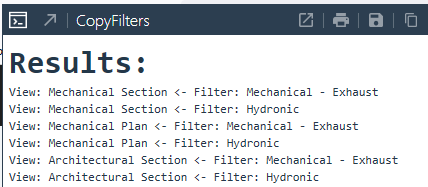
After clicking the confirm button, the program overwrites the filters and then returns us a list of transferred filters. Thanks to this, we can make sure that everything went as planned.
Film with instruction of use
Source code – Revit copy filters
Below is the program code from the first version of the overlay. For more please visit mine GitHub, where new versions of the overlay will appear on a regular basis.
Copyright (C) 2022 Paweł Kińczyk
from rpw import revit as rv
from Autodesk.Revit.UI.Selection import *
from Autodesk.Revit.DB import *
from pyrevit import forms
from pyrevit import output

doc = rv.doc
uidoc = rv.uidoc

class View_copy:
    def __init__(self):

        ## Get active view

        self.views_to_paste = []
        self.active_view = doc.ActiveView

        ## Get active view filters

        filters = [doc.GetElement(i) for i in self.active_view.GetFilters()]
        self.filter_dict = {x.Name : x for x in filters}
        views = FilteredElementCollector(doc).OfCategory(BuiltInCategory.OST_Views).WhereElementIsNotElementType().ToElements()
        views_template = []

        for view in views:
            if view.IsTemplate == True:
                views_template.append(view)

        self.views_dict = {Element.Name.GetValue(x) : x for x in views_template}

        ## Pick filters you want to copy

        self.selected_option_a = forms.SelectFromList.show(self.filter_dict.keys(), title = "Select filters in active view", multiselect=True,button_name='Select filters to copy')
        self.selected_option_b = forms.SelectFromList.show(self.views_dict.keys(), title = "Select views where you want to past filters", multiselect=True,button_name='Select views to past filters')

        ## Set filters to new view
        filters_overr = []
        filters_overr_id = []

        transaction = Transaction(doc, 'Add insulation - PYLAB')
        transaction.Start()

        try:

            for filter in self.selected_option_a:
                f = self.filter_dict[filter]
                filter_id = f.Id
                filters_overr.append(self.active_view.GetFilterOverrides(filter_id))
                filters_overr_id.append(filter_id)

            for view in self.selected_option_b:
                for filter_overr_id, filter_overr in zip(filters_overr_id, filters_overr):
                    self.views_dict[view].SetFilterOverrides(filter_overr_id, filter_overr)
                    print("View: " + str(view) + " <- Filter: " + str(doc.GetElement(filter_overr_id).Name))
        except TypeError as e:
            print("Error: \n You didn't pick any view or filter")
        except Exception as e:
            print("Error:")
            print(e)

        transaction.Commit()

output = output.get_output()
output.print_html('<font size="6"><strong>Results:</strong></font>')
a = View_copy()
Please report any irregularities in the operation of the program that occur during use on my social accounts or account GitHub.
See also: