
Hermes is not a model and not a chat. It is the layer that keeps the context, the tools and the next steps of a task, and calls the model when a decision is needed.
For the first few days, I treated Hermes like another chat with a model. I typed a question, got an answer and closed the window. That changed when I saw the same installation open task cards in the queue by itself, take screenshots of its own dashboard and save a note in Obsidian before I had even got up from my desk.
Hermes is an agent from Nous Research that runs on my server. It is not a model and it is not a chat. It is a layer that holds context, tools and the next steps of a task, and calls a model when a decision needs to be made. Below, I show what this looks like in practice on an installation running version 0.22.1.
What Hermes is, and what it is not
A language model is a function: it receives text and returns text. It does not remember yesterday’s conversation, reach for a file on disk or wait three days for a response from another system. Hermes adds three things a model does not have: a work loop, tools and memory.
The agent receives a task in Polish and chooses the tools itself: the terminal, browser, files and WordPress API. The model is called at decision points, for example when it has to assess which part of a text is suitable for publication. The model is the engine; Hermes is the whole machine, with a steering wheel, fuel tank and speedometer.
This leads to the first difference in day-to-day work. A chat answers; an agent acts. If you ask a chat to check the flow rate in a duct, you will get a calculation and a comment. If you ask an agent to do the same and give it a spreadsheet, you will get the calculation entered in the spreadsheet, with units and a source.
When an ordinary chat is enough
I’ll put this plainly, because otherwise the whole article would be an advert: in most cases, an ordinary chat is enough. If your question ends with a single answer that you will put into practice yourself, an agent is overkill. Explaining a standard, drafting an email or brainstorming a section title: a chat will do it faster and more cheaply.
An agent starts to pay off in three situations. First, the task has several steps and more than one tool, for example, “get the transcript, summarise it, save a note and add a task to the queue”. Second, the work needs to be repeated weekly or daily. Third, the task takes longer than one session at the computer and has to survive closing the browser.
The boundary is practical, not ideological. Count how many times a month you do the same sequence of steps. If it is fewer than three, leave it to a chat. If it is more, the agent will give you time back after the first week.
What the work looks like: Telegram, terminal, dashboard, background tasks
I access the same agent through four doors. Most often, I use Telegram, because I type my question on my phone on the way to work. The channel runs through a gateway, with the bot token kept in an environment file, not in the configuration itself.
The second door is the terminal. I run hermes there and get full access to project files. The third is the dashboard at a local address. It shows the same things as the terminal, but in a browser: chat, sessions, skills, schedule and task board. The fourth door is the background: tasks that do not need my attention at that moment, such as a night-time report.
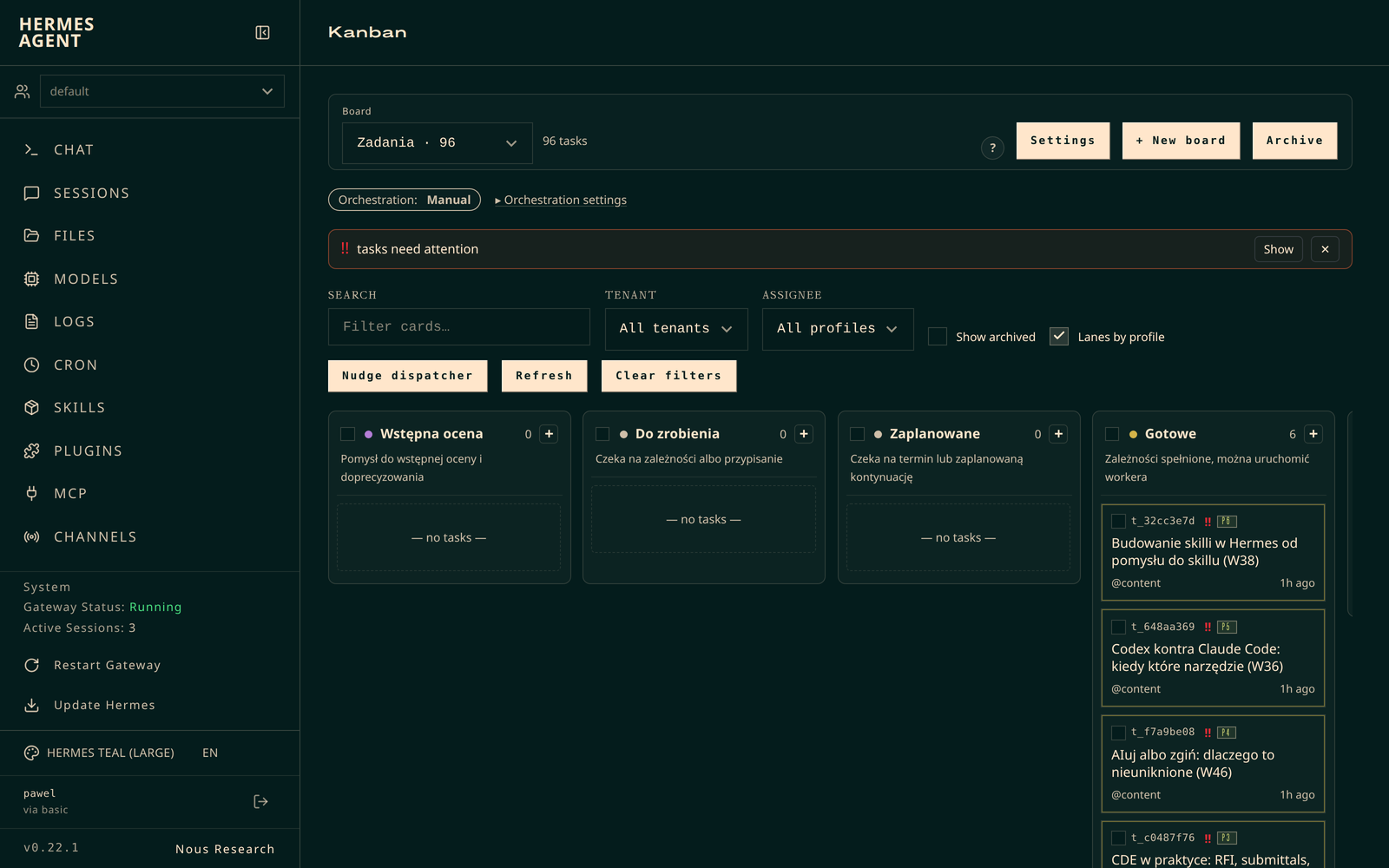
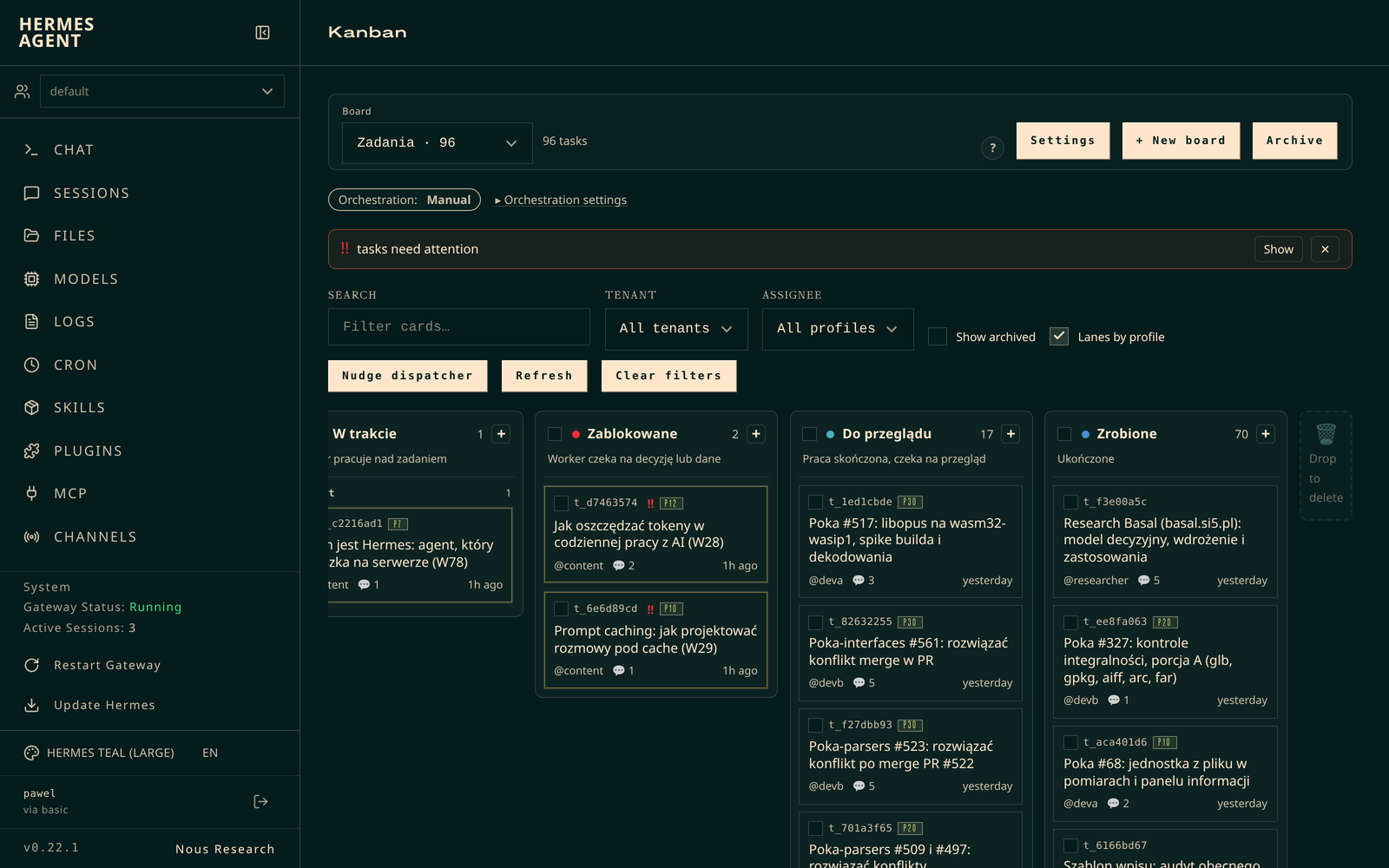
In the screenshot from 25 October 2026, the board has 96 tasks and the columns show the state of the work. These are not tasks made up for the article, but a queue I use every day. The cards have IDs, assigned profiles and comment threads.
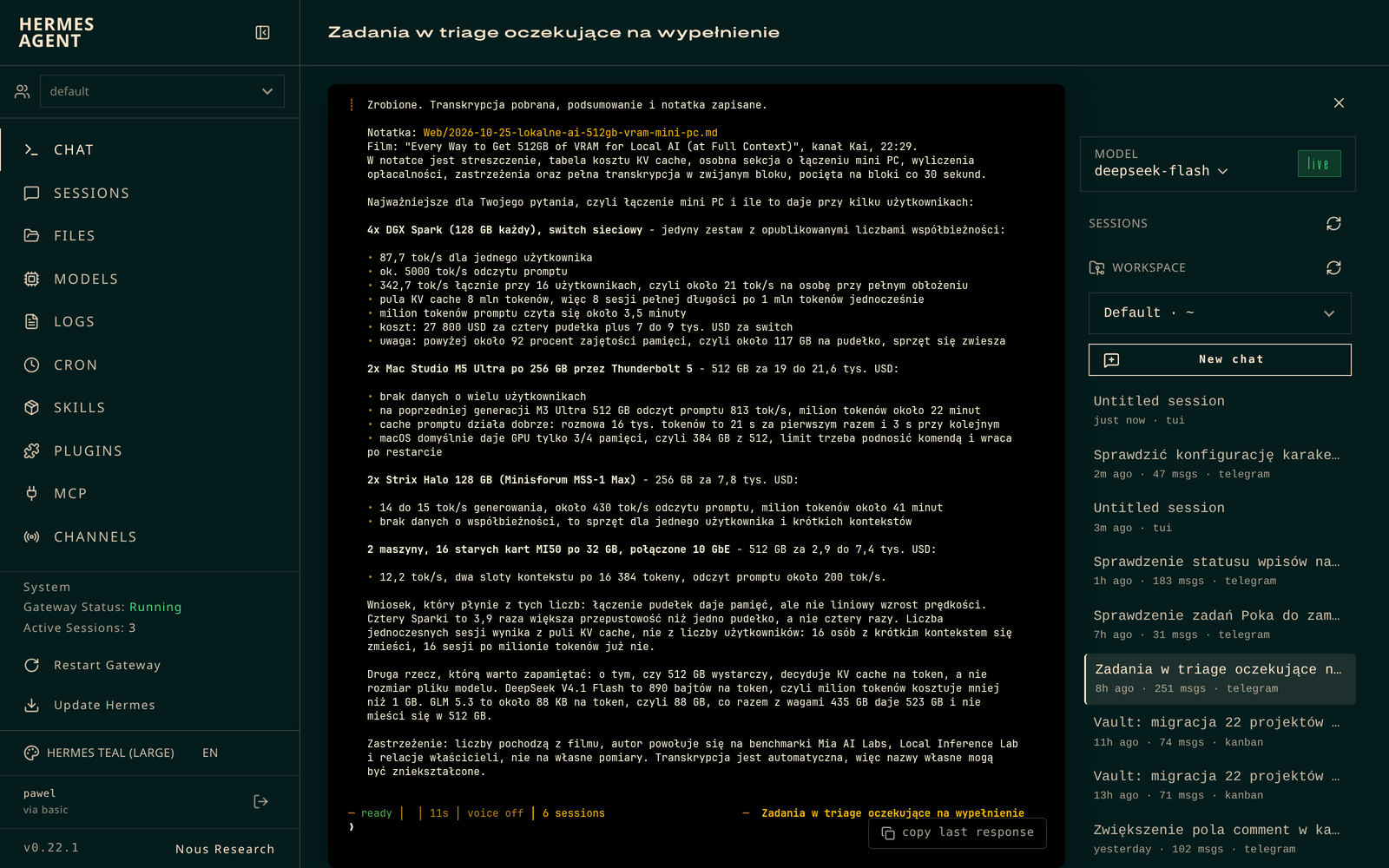
A Telegram conversation also leaves a trace. The screenshot shows a session with 251 messages: a request for a video transcript, a finished note and a list of figures the agent extracted from the recording. I can open the same thread in the dashboard and check which tools were called.
Profiles: separate context, skills and limits
A profile is one agent instance with its own configuration file, skills, memory, sessions and limits. You create one with a single command, hermes profile create coder, which creates the profile directory and a shortcut with the same name. From then on, coder is a separate command, not a parameter.
I have six profiles running. content writes posts and handles WordPress, researcher gathers sources, review checks other people’s results, deva and devb take programming tasks, and the default profile is for conversations. Each has a different set of skills and different permissions for tools.
This division has three concrete advantages. Context does not get mixed: the blog profile does not bring threads from a BIM project into a WordPress conversation. Costs stay under control, because light tasks go to a cheaper model and demanding ones to a more capable model. Permissions are narrower: the content profile does not need access to the code repository, so an accidental change is less likely.
Example configuration: provider, profile and one tool
An excerpt from ~/.hermes/config.yaml, without keys. The provider key comes from an environment variable, so I can show this file without risk. Each profile has its own file in the ~/.hermes/profiles/<name>/config.yaml directory.
model:
  default: your-model
  provider: your-provider

providers:
  your-provider:
    name: Your provider
    api: https://api.example.com/v1
    api_key: ${YOUR_PROVIDER_API_KEY}

terminal:
  cwd: /path/to/project

mcp_servers:
  files:
    command: npx
    args: ["-y", "@modelcontextprotocol/server-filesystem", "/path/to/project"]
The three blocks do three things. model says which model is the default for this profile. providers adds a provider compatible with the OpenAI API, with an address and a key from an environment variable. mcp_servers connects one external tool, a file server in this example, so the agent can read the project directory without asking me about every file.
What is not in this file, and should not be: keys written out in plain text, paths to client data and company names. Putting a key directly in the file is the most common mistake during a first installation, because the file ends up in the backup along with the rest of the directory.
Skills and memory: what loads every time, what loads on demand
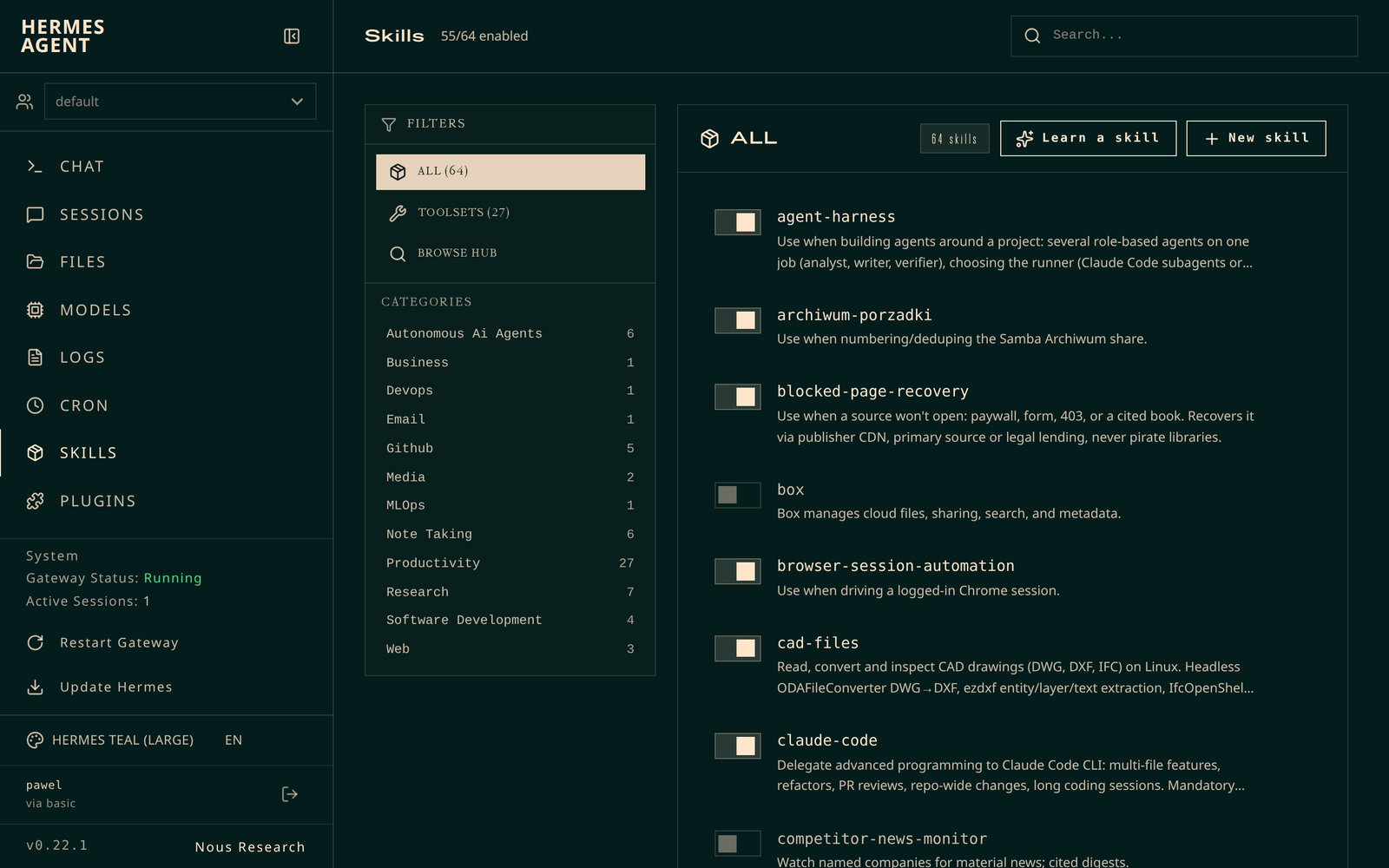
A skill is a directory with a SKILL.md file. The beginning of the file contains a name and description, followed by a procedure: when to run the skill, which steps to take and what to watch out for. Only the name and description go into the model’s context. The full content loads when a task matches the description.
This is not a technical detail, but a calculation. I have 55 of 64 skills enabled, and if every one of them sat in the context from the beginning of a conversation, there would be no room left for the task itself. In practice, the agent chooses a skill on its own, and I can invoke one directly with a slash, for example /content-04-seo-on-page.
Memory works the other way round: it is small and loads every time. I keep facts about myself and my environment there: who I am, what equipment I have and the project’s standing conventions. The rule I follow is: a fact about me goes into memory, a procedure goes into a skill. Memory has a character limit and needs tidying when that limit is exceeded, so it is not suitable as a notebook.
What you can automate: cron, queue, reports, documents
Scheduling is the simplest win. One command, hermes cron create „every 2h” „Check server status”, creates a task that runs without my involvement. A task can have a model assigned to it, its own reasoning level and specified skills, for example, the blogwatcher skill assigned to the task.
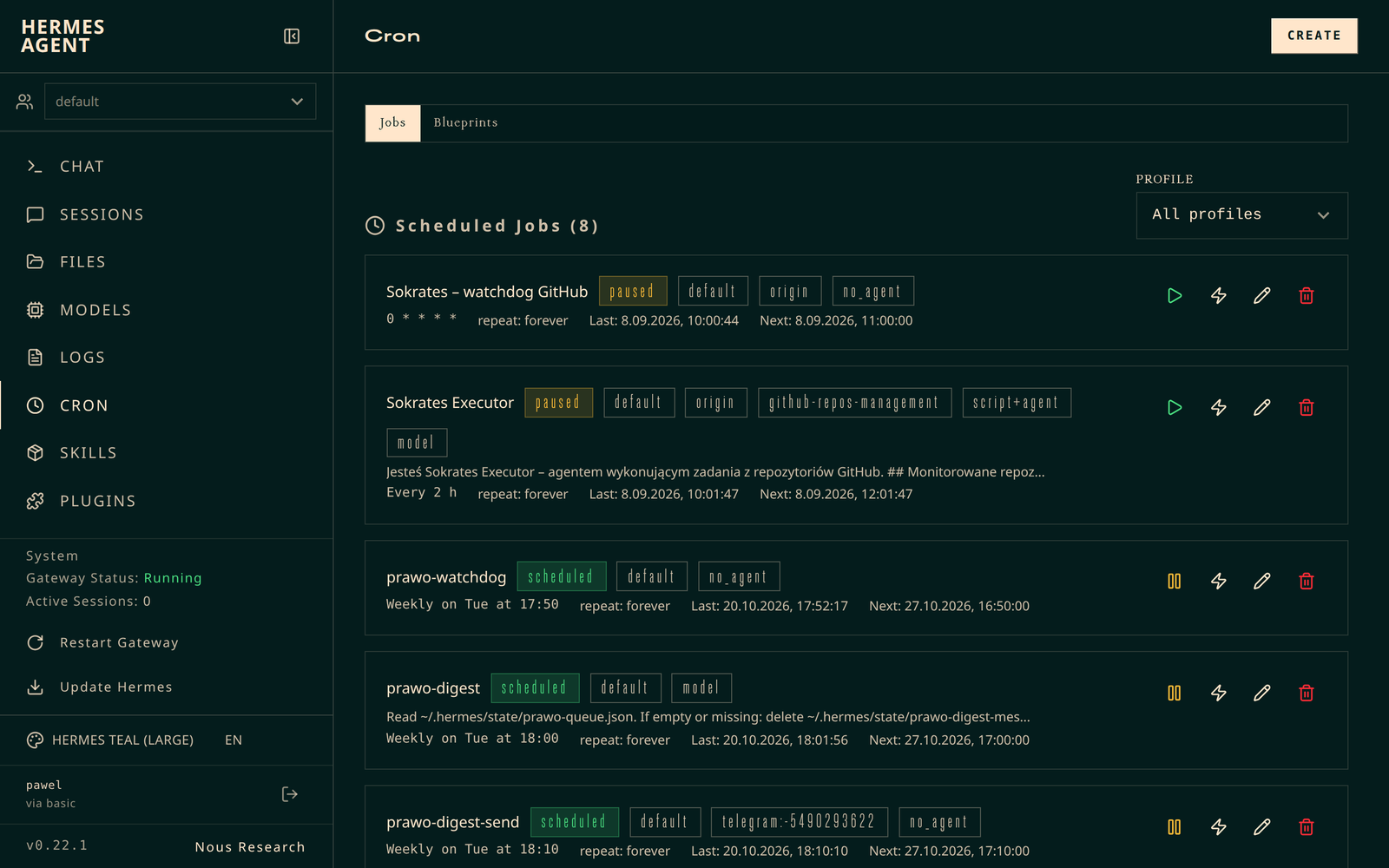
My dashboard shows eight scheduled tasks. One of them, a weekly legal review, gathers items from the queue and sends a finished summary to Telegram on Tuesday at around 17:50. This task makes no sense as a chat conversation, because no one is going to sit down at the same time every week just to remember it.
The second layer is a Kanban-style task queue. A card has a description, an assigned profile and acceptance criteria. The dispatcher takes the card, starts a worker and sends the result for review. This article was also created from a card like that, with a list of sections, requirements for screenshots and a rule that I do not publish without approval.
The third layer is documents and reports. The agent reads a spreadsheet, extracts data and assembles an output file: docx, xlsx or PDF. It does not do this better than a person, but it does it the same way every time, which is a bigger advantage than finesse when compiling a recurring report.
Where to start: a minimal installation and your first skill
Five steps, in this order. First: install with one line, curl -fsSL https://hermes-agent.nousresearch.com/install.sh | bash, on Linux, macOS or WSL2. Second: choose a model and provider in the wizard, which starts after installation.
Third: connect one channel. The terminal is enough to get started, while Telegram adds the convenience of asking questions from your phone. Fourth: create your first skill. Make a directory in ~/.hermes/skills//, add a SKILL.md file with a name, a description starting with “Use when” and a five-step procedure.
Fifth: add one automation, but only once the skill works. The best candidate is an activity you do every week that does not require a decision: reviewing channels, tidying notes or collecting figures for a report. The rest can wait, and an installation with ten integrations from the start usually ends with half of them unused.
Sources
Official documentation, checked on 25 October 2026: documentation home page, profiles, skills, memory, cron, Kanban, dashboard, configuration, messaging channels. All the URLs returned status code 200 that day.
Videos, checked on the same day using YouTube metadata: Meet the AI Agent That Grows With You (Eddy Says Hi), Hermes Agent + Agent Reach (Manish Jaipur Yt), Nous Research’s Hermes Agent: The Case for Open Models in Production (Arize AI).
The figures in the article come from my installation: version 0.22.1, 96 tasks on the board, columns with 1, 2, 17 and 70, 55 of 64 enabled skills, 8 cron tasks, 6 profiles and a Telegram session with 251 messages. All readings from the dashboard and session database are from 25 October 2026; screenshots are in the article directory.
Related posts: [Hermes Agent, is it worth it?], [Building skills for engineers] and [Task routing] (accessed 2026-10-25).
Check also:
- Task Cost Measurement: The Tool Report Is Not an Invoice
- Comfort at the Computer: An Ergonomic Workstation Step by Step
- Chinese AI Models: What Happens to the Data You Send Them
- Many Mailboxes in One System: Thunderbird and AI
- What Computer for Revit and BIM in 2026: CPU, GPU, RAM and SSD
This article was created with the help of artificial intelligence.



[…] What is Hermes: the agent that lives on a server […]
[…] What is Hermes: the agent that lives on a server […]