
Copying parameters in Revit within a single parameter is a time-consuming task. Thanks to the function of copying parameters in my overlay PYLAB you will be able to easily rewrite the value of any parameters for all elements of the selected category.
In “Revit copy parameters” post:
- Revit copy parameters – program idea
- How program works
- Film with program in action
- Source code
- See also

Revit copy parameters – program idea
The program for copying parameters for many elements is designed to speed up the process of parameterization of the Revit model. Thanks to this, there is no need to rewrite the values manually. When can you use it?
- Preparing the model for release according to BEP assumptions. Many investors require that the relevant data be in specially created parameters.
- When transferring data to other industries. A suggestively named parameter will reduce the risk of confusion.
- When we create a list and we would like to edit some non-editable parameters. If we rewrite them to our own parameter, we will be able to change them.
Instruction how to install my extension you can find here.
How program works
First, the program asks us to indicate the element. Relative to its category, the program will select all elements in the model.

Then the program will ask us to select the parameter to be copied. The list is arranged alphabetically. Thanks to this, it is possible to quickly find the variable we are interested in.
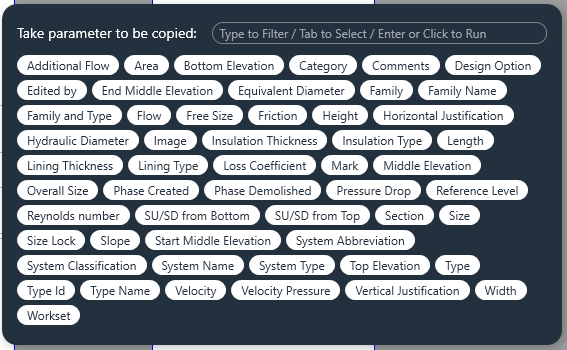
In the last step, the program filters the parameters to which we can rewrite the selected value. If we create our own parameter of the same type as the copied variant, we will find it in this list.

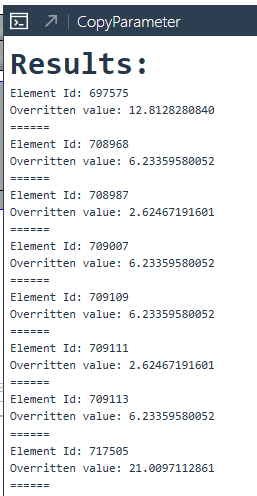
After the last selection, the program will rewrite the values in all elements. At the end of the process, we will receive a list of elements that have been rewritten / or not. We will also learn about errors.
Film with program in action
Source code – Revit copy parameters
Below is the program code from the first version of the overlay. For more please visit mine GitHub, where new versions of the overlay will appear on a regular basis.
Copyright (C) 2022 Paweł Kińczyk
## Imports

import sys
from rpw import revit as rv
from pyrevit import forms
from pyrevit import output
from Autodesk.Revit.UI.Selection import *
from Autodesk.Revit.DB import *

## Revit doc

doc = rv.doc
uidoc = rv.uidoc

## Class and def

def Pargetstr(element, name):
    return (element.GetParameters(name))[0].AsValueString()

## Pick family of choosen element

try:
    with forms.WarningBar(title="Pick element in model, program will get his category"):
        collector = uidoc.Selection.PickObject(ObjectType.Element)

except Exception as e:
    print("Nothing was picked")
    sys.exit(1)

collector=collector.ElementId
collector=doc.GetElement(collector)
collector_cat_id=collector.Category.Id
picked_el=collector
type=collector.GetType()
collector=FilteredElementCollector(doc).OfClass(type).WhereElementIsNotElementType().ToElements()

## Get the elements of the same Family and Type

elements=[]
for i in collector:
    if Pargetstr(i, "Family and Type")==Pargetstr(picked_el, "Family and Type"):
        elements.append(i)
    else:
        pass

## Get parameters

parameters={}
parameters_editable={}
for i in elements[0].Parameters:
    parameters.update({i.Definition.Name:i})

## Take parameter to be copied

parameters_list=sorted(parameters.keys())

selected_option_a = forms.CommandSwitchWindow.show(
    parameters_list,
     message='Take parameter to be copied:',recognize_access_key=False
)

## Collecting parameters by storage type
try:
    for i in elements[0].Parameters:
        if  i.IsReadOnly == False and i.StorageType == StorageType.String and i.Definition.Name != selected_option_a:
            parameters_editable.update({i.Definition.Name:i})
        elif i.IsReadOnly == False and parameters[selected_option_a].StorageType == i.StorageType and i.Definition.Name != selected_option_a and i.CanBeAssociatedWithGlobalParameters() ==True:
            parameters_editable.update({i.Definition.Name:i})
        else:
            pass
except KeyError as e:
    print("You don't pick element")
    sys.exit(1)

## Choose parameter to overwrite value

parameters_list_editable=sorted(parameters_editable.keys())

selected_option_b = forms.CommandSwitchWindow.show(
    parameters_list_editable,
     message='Take parameter to set:',recognize_access_key=False
)


## Choose parameter to overwrite value

output = output.get_output()
output.print_html('<font size="6"><strong>Results:</strong></font>')

t = Transaction(doc, "Override parameter - PYLAB")
t.Start()

for i in elements:
    try:
        parameter_a = i.LookupParameter(selected_option_a)
        parameter_b = i.LookupParameter(selected_option_b)

        if parameter_a.StorageType == StorageType.String and parameter_b.StorageType == StorageType.String:
            parameter_b_overr=parameter_a.AsString()
            parameter_b.Set(parameter_b_overr)
            print("Element Id: " + str(i.Id))
            print("Overritten value: " + str(parameter_b_overr))
            print("="*6)

        elif parameter_a.StorageType == StorageType.Double and parameter_b.StorageType == StorageType.Double:
            parameter_b_overr=parameter_a.AsDouble()
            parameter_b.Set(parameter_b_overr)
            print("Element Id: " + str(i.Id))
            print("Overritten value: " + str(parameter_b_overr))
            print("="*6)
        elif parameter_a.StorageType == StorageType.Integer and parameter_b.StorageType == StorageType.Integer:
            parameter_b_overr=parameter_a.AsInteger()
            parameter_b.Set(parameter_b_overr)
            print("Element Id: " + str(i.Id))
            print("Overritten value: " + str(parameter_b_overr))
            print("="*6)
        else:
            parameter_b_overr=parameter_a.AsValueString()
            parameter_b.Set(parameter_b_overr)
            print("Element Id: " + str(i.Id))
            print("Overritten value: " + str(parameter_b_overr))
            print("="*6)
    except TypeError as e:
        print("Error: \n Element don't have this value")
        print("Element Id: " + str(i.Id))
        print("="*6)
    except Exception as e:
        print("Element Id: " + str(i.Id))
        print("Error message: " + str(e))
        print("="*6)

t.Commit()
Please report any irregularities in the operation of the program that occur during use on my social accounts or account GitHub.
Also check:
- Revit connect pipes
- Air calculator
- Revit shortcuts
- Dynamo – locating elements in spaces
- Revit pipes type change